The Arcade Program
The ultimate professional dashboard to calculate your points, monitor live leaderboard rankings, and track your cloud skills journey.
Disclaimer: This website is an independent, community-built tool and is not an official website of Google Cloud Arcade or Google, community-built tool designed simply to help you calculate your Arcade points and learn Google Cloud skills together with the community.
Start Arcade Labs
Follow simple steps to kickstart your experience, and leverage powerful tools specifically designed to help you track, calculate, and boost your Arcade points.
Arcade Start
Sign in Account
Sign up on Cloud Skills Boost and set up your Arcade profile.
Registration
Enroll in Arcade to unlock labs, points and challenges.
Start Labs
Complete labs, earn points & Get Google Cloud rewards.
Facilitator Program
Join the program & Win Exclusive Points & rewards.
Arcade Tools
Points Calculator
Get reliable Arcade point calculation directly from your profile URL.
Smart Dashboard
View total points, recent activity, rank and history cleanly.
Live Leaderboard
Compete with others and track your position in real-time.
Facilitator Page
Get expert guidance, FAQs, and connect directly with community leads.
Swags 2026 revealed soon
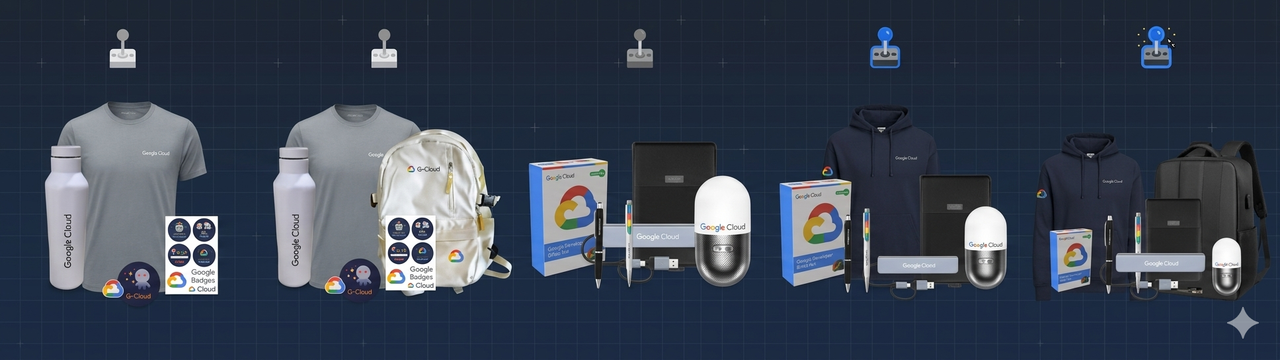
Google Arcade Swags Review
Live tracking and community feedback
Leave a Review
🌟 Share Your Community Experience!
How much did this platform and our community guidance help you? Please share your valuable feedback and support using the review box above. Your feedback keeps us motivated!
Problem Submission Form
Drop a message regarding your Swags, Labs, or Arcade Points. Our community team will look into it directly.
Apply for Coordinator
Join our core team! Help guide the community, manage arcade initiatives, and grow your leadership skills with us.
Arcade Points System
Understand exactly how your effort translates to your final score. Collect badges across different tracks to maximize your rewards.
Arcade Adventure
Standard track progression
Arcade Voyage
Intermediate cloud challenges
Arcade Trail
Advanced guided paths
Skill Badges
90+ Skills Badges available
Special Badges
Limited-time exclusive
Arcade Facilitator Program
The Facilitator Program offers bonus points for participants. Complete required games, trivia, skill badges, and lab-free courses to achieve milestones & get massive point boosts.
Join under a Facilitator
Register your profile under an active community facilitator to start your accelerated earning journey.
Get Support & Guidance
Receive exclusive help, step-by-step strategies, and doubt resolution from your community lead.
Reach Milestone Targets
Hit specific lab completion goals and track milestones to unlock massive point boosts at the end.
Watch the Video Tutorial & Get 309$ Credits
Follow along with this step-by-step video guide
309FREECREDITS
Special Credit Link
Use this exclusive link to receive your 309 credits
Last updated & verified: February 2026
Special Link:
Step-by-Step Guide
🚪 Sign Out of Your Google Skills Account
Before starting, make sure you log out of your Google Skills account. This is important to ensure the credits are applied correctly.
🔗 Open the Special Credit Link
Visit the exclusive link provided above or in the video description.
🔑 Sign In to Your Google Skills Account
Once the link opens, sign in using your Google account, or your email and password manually.
🎁 Receive Initial Credits
After signing in through the special link, you will automatically receive 9 credits in your account.
💻 Complete One Lab from the Catalog
To unlock the remaining credits, from the Google Skills Catalog, search for 'hands on'. Select 'A Tour of Google Cloud Hands-on Labs' (recommended for beginners).
💯 Finish the Lab with 100% Score
Complete the selected lab and ensure you achieve a 100/100 score. This may include opening the Google Cloud Console, assigning permissions to a principal, and enabling a required API.
✅ Verify Your Total Credits
After ending the lab, visit the Billing / Payments page of your Google Skills Account and confirm that 300 additional credits have been added.
✓Pro Tips for Success
- Always sign out first - This is the most common reason credits don't apply
- Use the special link - The code at the end of the URL is essential
- Complete the lab 100% - Follow all instructions carefully for full credit
- Check your billing page - Verify credits are added after completing the lab
- Be patient - Sometimes credits take a few minutes to appear